With the encouragement 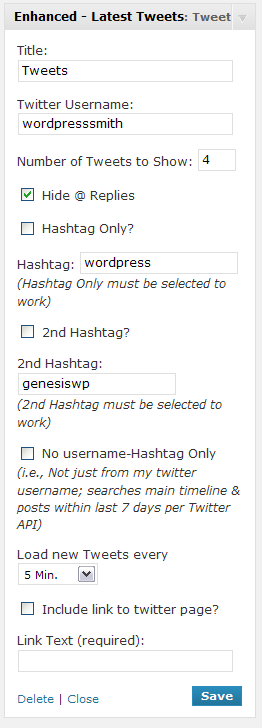 of Nathan Rice from StudioPress and the huge help from Nick the Geek, I have developed my first plugin.
Enhanced Latest Tweets Widget extends the twitter widget which will now allow you to display a certain number of tweets by a specified user with a specified hashtag in a widget. On the admin side, given the twitter username, you can tell:
- how many of the last tweets that you want to display,
- whether to hide replies, and
- then whether you want to limit the output to contain a certain hashtag (with or without the #).
This widget also enhances the Genesis Theme Framework Twitter Widget. This allows it to take full advantage of the styling already present in the Child Themes while providing the advanced hashtag feature.
This plugin works with the [Genesis Theme Framework] and [Thesis 1.7 Framework].


that’s truly a very cool plugin, thank you !